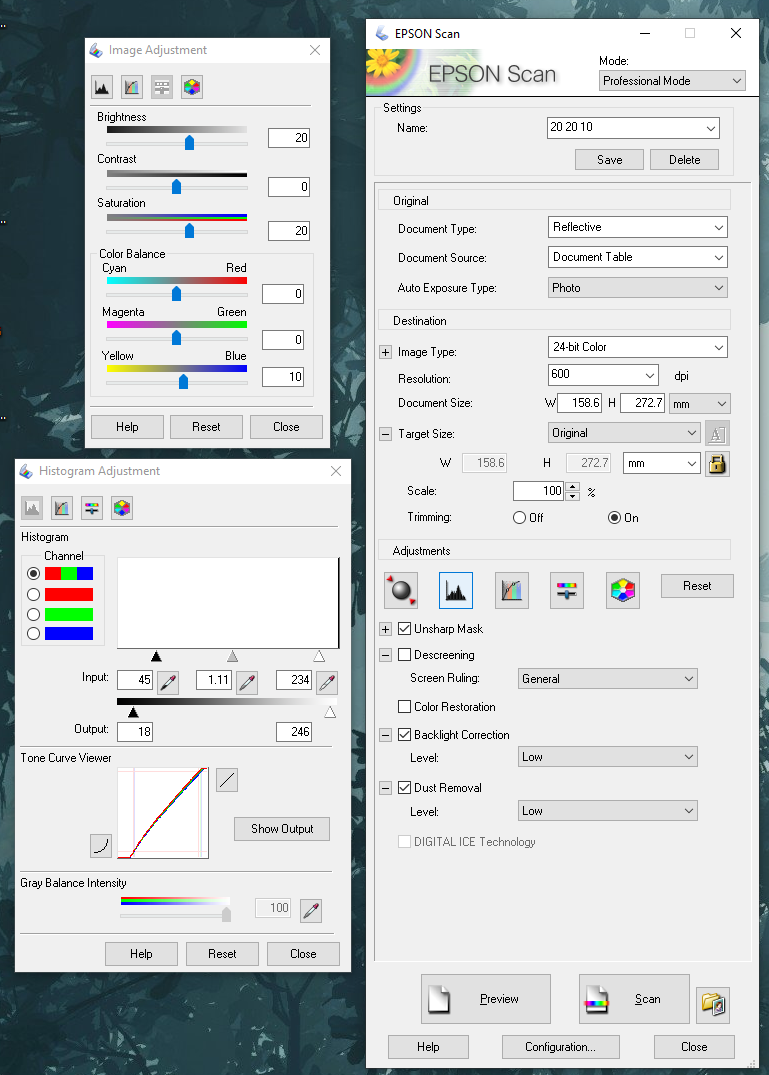
I’m just wondering is there a reason that you use the first version of the Epson Scan application instead of the newer Epson Scan 2 released in June 2023? Or have you since made the change to that?
fwiw scan 2 works sufficiently well for scanning my raw cards in great quality with the settings from this thread (well with as many of the settings as scan 2 supports lol)
Here are the same settings as above but for Epson Scan 2. Before editing your settings, you have to put a card in the scanner and click “Preview”. If you don’t do this, the color options will be disabled.
Any settings not shown are unchanged from the defaults.
Oh wow! Thank you so much - does this happen to include any “prizm or refractor” type sports cards? Or do you do strictly TCG with these settings? I really appreciate you.
I’ve never tried it with those types of cards so I can’t say for certain, but everything that I’ve scanned has looked incredible. I would be surprised if it didn’t work on prizm or refractor types
I always scan with it closed, I didn’t even know you could scan with it open. If you want a black background you can remove the document mat (the white insert at the top) and either put some black cardboard-esque piece in its place or tape something black to it. I don’t mind the white background so I don’t have any recommendations for that.
I scan open so the background is black. I make sure to align exactly the same way, you can also buy scanner bed frames so you can align more easily. Then I use a simple script with ImageMagick to crop all the images in bulk and save them.
If you do a bulk scan session, and if they are all aligned, you can write a bit of code to automatically cut and crop the images and output everything. It saves quite a bit of time and makes the output consistent.